What Is My IP Address? How Proxies Change It
Understand how IP addresses work, how proxies mask your real IP, how to verify your proxy is working, and how to prevent DNS leaks that expose your identity.
What Is My IP Address? How Proxies Change It
Every device connected to the internet has an IP address — a numerical label that identifies it on the network. Your IP address reveals your approximate geographic location, your internet service provider, and can be used to track your online activity across websites. Proxies change your visible IP address by routing traffic through an intermediary server, but the details of how this works — and what can go wrong — are worth understanding.
How IP Addresses Work
When you visit a website, your device sends a request that includes your IP address as the return address. The website's server needs this address to send the response back to you. This is fundamental to how the internet works — without IP addresses, servers would not know where to send data.
There are two types of IP addresses you encounter daily:
IPv4 addresses look like 192.168.1.1 — four numbers separated by dots, each between 0 and 255. There are roughly 4.3 billion possible IPv4 addresses, and they are largely exhausted.
IPv6 addresses look like 2001:0db8:85a3:0000:0000:8a2e:0370:7334 — eight groups of four hexadecimal digits. IPv6 was designed to solve the address exhaustion problem, providing an effectively unlimited number of addresses.
Your public IP address is what websites see. It is assigned by your ISP and typically shared by all devices on your home or office network via NAT (Network Address Translation). Your private IP address (like 192.168.x.x) is used internally on your local network and is not visible to the outside world.
What Your IP Address Reveals
Your IP address is not just a technical detail. It reveals:
- Geographic location: IP geolocation databases can identify your city, and sometimes your neighborhood, with reasonable accuracy.
- ISP identity: Your internet service provider is directly tied to your IP range.
- Organization: If you are on a corporate or university network, the organization name is often identifiable.
- Browsing history correlation: Websites, analytics services, and ad networks use IP addresses to link your visits across sessions and sites.
This is why privacy-conscious users and professionals working with multiple online accounts use proxies to mask their real IP addresses.
How Proxies Change Your IP
When you route traffic through a proxy server, the process works like this:
- Your device sends a request to the proxy server.
- The proxy server forwards the request to the destination website.
- The website sees the proxy's IP address, not yours.
- The website sends the response to the proxy.
- The proxy forwards the response back to you.
The destination website only ever communicates with the proxy. Your real IP address stays hidden — assuming the proxy is configured correctly.
Different proxy types provide different levels of anonymity:
Transparent Proxies
These forward your request but include your real IP in the X-Forwarded-For header. The destination website can see both the proxy IP and your real IP. Transparent proxies provide no anonymity and are typically used for caching or content filtering in corporate networks.
Anonymous Proxies
These hide your real IP but include headers that indicate a proxy is being used (like Via). The destination knows you are using a proxy but cannot determine your real IP.
Elite (High-Anonymity) Proxies
These hide your real IP and do not add any proxy-related headers. The destination has no way to tell that a proxy is involved. These are the best choice for privacy, web scraping, and social media management.
You can test what level of anonymity your proxy provides using our Proxy Checker tool.
The DNS Leak Problem
Even with a properly configured proxy, your privacy can be compromised by DNS leaks. Here is how:
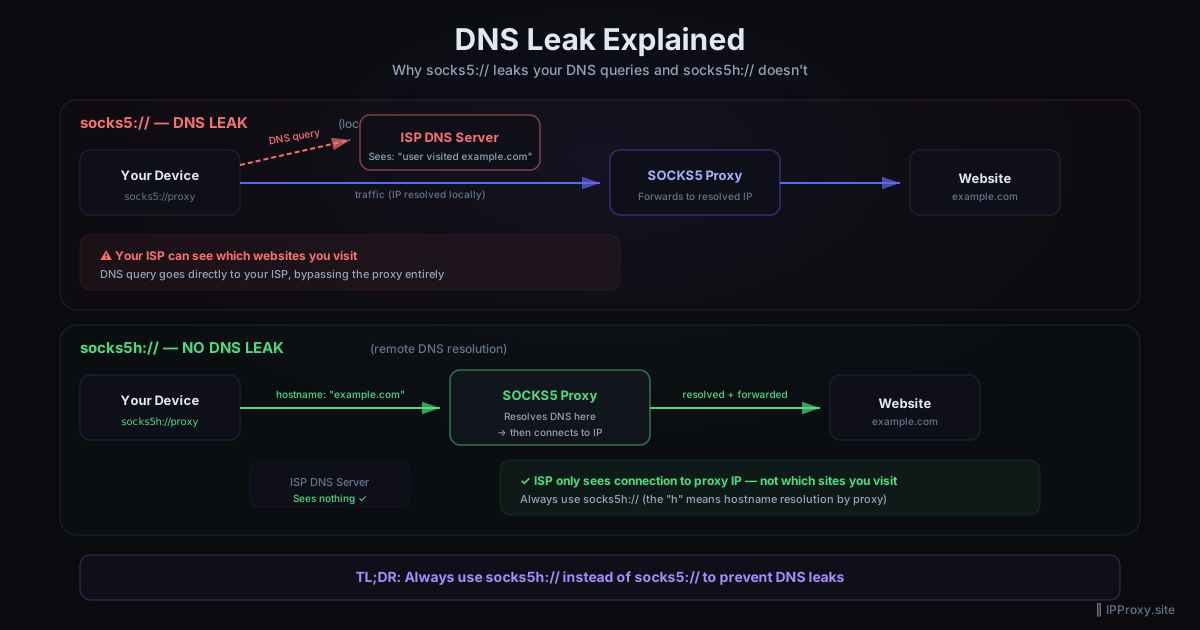
When you type a domain name like example.com into your browser, your device needs to look up the corresponding IP address. This lookup is called a DNS query. If your DNS queries go directly to your ISP's DNS servers instead of through the proxy, your ISP can see which websites you are visiting — even though the actual web traffic goes through the proxy.
This is a DNS leak, and it is one of the most common proxy misconfigurations.
How to Prevent DNS Leaks
Use SOCKS5 with remote DNS resolution: When configuring a SOCKS5 proxy, use the socks5h:// protocol prefix (note the h) instead of socks5://. The h variant tells your client to send DNS queries through the proxy, resolving them on the proxy server side.
Configure your system DNS: Point your system DNS to a privacy-focused resolver like Cloudflare (1.1.1.1) or a DNS server in the same location as your proxy.
Test for leaks: After configuring your proxy, visit a DNS leak test site through the proxy. If you see your ISP's DNS servers in the results, you have a leak.
Use our tools: The Proxy Checker on ipproxy.site tests for DNS leaks as part of its validation process.
How to Verify Your Proxy Is Working
Setting up a proxy is one thing. Confirming it works correctly is another. Follow this checklist:
1. Check Your Visible IP
Visit an IP-checking service through your proxy. The IP displayed should be the proxy's IP, not your real one. If you see your real IP, the proxy is not routing traffic correctly.
2. Verify Geographic Location
The IP geolocation should match the proxy server's location, not yours. If you are using a proxy in Germany but the geolocation shows your home city, something is wrong.
3. Test for DNS Leaks
As described above, ensure your DNS queries are routed through the proxy. A clean proxy setup means no trace of your ISP in DNS results.
4. Check for WebRTC Leaks
WebRTC, a technology built into browsers for real-time communication, can leak your real IP even when a proxy is active. This is a browser-level issue. Disable WebRTC in your browser settings or use a browser extension to block it.
5. Inspect Response Headers
Some poorly configured proxies add headers that reveal information. Check the response headers for X-Forwarded-For, Via, or other proxy-related entries.
Practical Use Cases for IP Masking
Understanding how proxies change your IP opens up several practical applications:
Privacy: Prevent websites and advertisers from tracking you by your IP address. Rotate proxies to make tracking across sessions impossible.
Accessing geo-restricted content: Use a proxy in the target country to access content that is region-locked. Our guide on proxy vs VPN compares the best approaches for this.
Market research: Check localized pricing, ads, and search results from different regions without physically being there.
Security testing: Penetration testers use proxies to test how systems respond to traffic from different IP addresses and locations.
Multi-account management: Platforms track IP addresses to detect users running multiple accounts. Assigning a unique proxy to each account keeps them isolated.
Getting Started with IP Masking
If you are new to proxies, here is the fastest path to getting set up:
- Get a validated proxy list from ipproxy.site's download page.
- Use the Proxy Converter to format the list for your specific tool or browser extension.
- Configure your application to use the proxy.
- Verify your setup with the Proxy Checker.
- Check our free proxy list guide for ongoing sources.
Conclusion
Your IP address is a window into your identity and location. Proxies close that window by replacing your real IP with the proxy server's IP, but only when configured correctly. DNS leaks, WebRTC leaks, and low-anonymity proxies can all undermine your efforts. Test your setup thoroughly, use elite-level proxies, and resolve DNS through the proxy to maintain real privacy.
Related Guides
Get a Fresh, Tested Proxy Right Now
Every proxy is validated every 30 minutes. 1644 working proxies available right now.