Proxy vs VPN: Which Should You Use in 2026?
An in-depth comparison of proxies and VPNs in 2026. Learn the differences in speed, security, cost, and use cases to decide which is right for you.
Proxy vs VPN: Which Should You Use in 2026?
Proxies and VPNs both route your internet traffic through an intermediary server, but they work very differently under the hood. Choosing the wrong one for your use case can mean wasted money, poor performance, or inadequate security. This guide breaks down the real differences between proxies and VPNs in 2026, compares them on the metrics that matter, and tells you exactly when to use each.
How Proxies Work
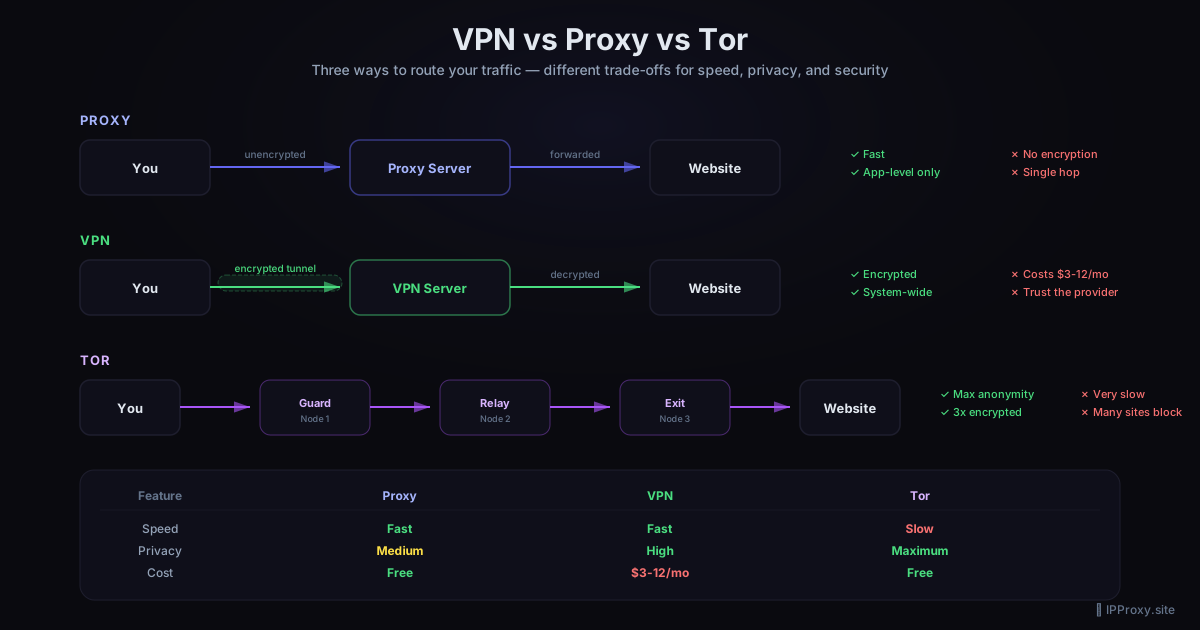
A proxy server acts as a gateway between you and the internet. When you send a request through a proxy, the request goes to the proxy server first, which then forwards it to the destination. The destination sees the proxy's IP address, not yours.
Key characteristics of proxies:
- Application-level: Proxies typically work per-application. Your browser can use a proxy while the rest of your system connects directly.
- Protocol-specific: HTTP proxies handle web traffic. SOCKS5 proxies handle any TCP traffic. Each type has its strengths — see our SOCKS5 scraping guide for details.
- No encryption by default: Standard HTTP proxies do not encrypt traffic between you and the proxy. HTTPS proxies encrypt the tunnel, but this is not universal.
- Lightweight: Proxies add minimal overhead, making them fast for high-volume tasks.
How VPNs Work
A VPN (Virtual Private Network) creates an encrypted tunnel between your device and a VPN server. All traffic from your device — every application, every protocol — is routed through this tunnel.
Key characteristics of VPNs:
- System-level: A VPN routes all traffic from your device, not just one application. There is no risk of an app bypassing the VPN accidentally.
- Full encryption: VPNs encrypt all traffic between your device and the VPN server using protocols like WireGuard or OpenVPN.
- IP masking: Like proxies, VPNs replace your IP address with the server's IP.
- Higher overhead: The encryption and encapsulation add latency and reduce throughput compared to a raw proxy connection.
Head-to-Head Comparison
| Feature | Proxy | VPN |
|---|---|---|
| Encryption | Optional (HTTPS/SOCKS5 with TLS) | Always on |
| Coverage | Per-application | System-wide |
| Speed | Faster (less overhead) | Slower (encryption cost) |
| Setup | Per-app configuration | One system-wide install |
| Cost | Free to low cost | Subscription-based ($3-12/month) |
| Anonymity | Varies by type (transparent to elite) | Consistent (depends on provider) |
| Best for | Scraping, multi-account, geo-targeting | Privacy, security, public Wi-Fi |
When to Use a Proxy
Proxies excel in scenarios where you need speed, flexibility, and the ability to manage multiple identities simultaneously.
Web Scraping
Scraping requires rotating through many IP addresses quickly. Proxies let you assign different IPs to different requests or sessions. A VPN only gives you one IP at a time. For large-scale data collection, proxy pools are the standard tool. Read more in our SOCKS5 scraping guide.
Social Media Management
Managing multiple social media accounts from one device requires multiple IP addresses. Each account needs its own proxy to avoid detection and bans. VPNs cannot do this because they apply one IP to all traffic. Our guide on proxies for social media management covers this in depth.
Geo-Restricted Content Access
Need to access a website as if you are in a specific country? A proxy in that country does the job with less speed penalty than a VPN. This is especially useful for market research, ad verification, and price comparison.
SEO and SERP Monitoring
Checking search engine results from different locations requires proxies from those locations. You can switch proxies per request, which is impossible with a VPN.
Testing and Development
Developers use proxies to test how their applications behave from different IP addresses and locations. Proxies provide the granular control needed for this.
When to Use a VPN
VPNs are the better choice when security and blanket privacy are your priorities.
Public Wi-Fi Protection
On coffee shop or airport Wi-Fi, a VPN encrypts all your traffic, preventing eavesdropping. A proxy would only protect the specific application configured to use it — your email client, messaging apps, and background services would still be exposed.
Personal Privacy
If your goal is to prevent your ISP from seeing your browsing activity, a VPN covers everything. A proxy only protects the applications you explicitly configure.
Accessing Region-Locked Streaming
While proxies can bypass geo-restrictions, many streaming services actively detect and block proxy traffic. VPN providers invest heavily in maintaining access to streaming services with dedicated IP ranges.
Corporate Security
Businesses use VPNs to secure remote employee access to internal networks. This is a fundamentally different use case from proxies — it is about securing a network tunnel, not masking individual requests.
What About Tor?
Tor is a third option worth mentioning. It routes your traffic through multiple volunteer-operated nodes, encrypting at each hop. Tor provides the strongest anonymity but is extremely slow — often 10-50x slower than a proxy or VPN. It is not suitable for scraping, streaming, or anything requiring speed. For most users, a proxy or VPN is the practical choice.
Cost Comparison in 2026
Free proxies are available but come with reliability and security tradeoffs. Our free proxy list guide explains how to find ones that actually work.
Paid proxy services range from $5 to $50+ per month depending on the type (datacenter vs residential) and volume. Residential proxies are the most expensive but offer the best detection avoidance.
VPN subscriptions typically cost $3 to $12 per month with annual billing. Most providers offer servers in 50+ countries. The per-month cost is predictable, but you only get one IP at a time.
For scraping and multi-account work, proxies are more cost-effective because you can buy exactly the volume you need. For personal privacy, a VPN subscription is simpler and covers everything.
Can You Use Both?
Yes. A common setup is to run a VPN for baseline privacy and route specific applications through proxies for tasks that need IP rotation. For example:
- VPN active system-wide for encrypted browsing
- Browser configured to use a SOCKS5 proxy for scraping tasks
- Social media tools each assigned their own proxy
This layered approach gives you the best of both worlds.
How to Verify Your Setup
Whatever you choose, verify that it is working correctly. Use the Proxy Checker on ipproxy.site to confirm:
- Your real IP is hidden
- DNS queries are not leaking (learn more about DNS leaks and IP masking)
- The proxy or VPN is routing traffic as expected
- Your anonymity level matches your requirements
Conclusion
Proxies and VPNs are complementary tools, not competitors. Proxies give you speed, granular control, and multi-IP capability for tasks like scraping and account management. VPNs give you system-wide encryption and privacy. Match the tool to the job, verify your setup, and you will be well-covered in 2026.
Explore validated proxy lists on ipproxy.site's download page or test your current setup with our Proxy Checker.
Related Guides
Get a Fresh, Tested Proxy Right Now
Every proxy is validated every 30 minutes. 1644 working proxies available right now.