How to Use a Proxy in Python Requests (With Working Examples)
Step-by-step guide to routing Python requests through HTTP and SOCKS5 proxies. Covers rotating proxies, error handling, and testing. Works in 2026.
Sending requests through a proxy in Python is three lines of code. But doing it reliably — handling dead proxies, rotating addresses, and not leaking your real IP — takes a bit more thought. This guide covers everything from the basics to production-ready patterns.
The Basics: One Proxy, One Request
The requests library accepts a proxies dictionary that maps protocols to proxy addresses:
import requests

proxies = {
    "http":  "http://IP:PORT",
    "https": "http://IP:PORT",
}

response = requests.get("https://httpbin.org/ip", proxies=proxies, timeout=10)
print(response.json())
# {"origin": "PROXY_IP"}
If the returned IP matches the proxy address instead of your machine's real IP, it's working.
The proxies dict uses the request protocol as the key, not the proxy protocol. So even if you're fetching an HTTPS URL, you still set "https" → "http://..." when using an HTTP proxy.
Using SOCKS5 Proxies
HTTP proxies only handle web traffic. SOCKS5 proxies work with any TCP connection and are faster for scraping because they don't inspect or modify your headers.
To use SOCKS5 with requests, install the SOCKS extension first:
pip install requests[socks]
Then use socks5:// in the proxy URL:
import requests

proxies = {
    "http":  "socks5://IP:PORT",
    "https": "socks5://IP:PORT",
}

response = requests.get("https://httpbin.org/ip", proxies=proxies, timeout=10)
print(response.json())
For SOCKS5 with username and password authentication:
proxies = {
    "http":  "socks5://username:password@IP:PORT",
    "https": "socks5://username:password@IP:PORT",
}
Using a Session (Recommended for Multiple Requests)
If you're making several requests through the same proxy, use a Session instead of calling requests.get() each time. Sessions reuse the TCP connection and apply the proxy to every request automatically:
import requests

session = requests.Session()
session.proxies = {
    "http":  "http://IP:PORT",
    "https": "http://IP:PORT",
}

# Both requests go through the proxy
r1 = session.get("https://httpbin.org/ip")
r2 = session.get("https://example.com")
Handling Dead Proxies Gracefully
Free proxies go offline constantly. Wrap every proxied request in error handling so one dead proxy doesn't kill your script:
import requests

def fetch_with_proxy(url, proxy_ip, proxy_port, timeout=10):
    proxies = {
        "http":  f"http://{proxy_ip}:{proxy_port}",
        "https": f"http://{proxy_ip}:{proxy_port}",
    }
    try:
        response = requests.get(url, proxies=proxies, timeout=timeout)
        response.raise_for_status()
        return response
    except requests.exceptions.ProxyError:
        print(f"Proxy {proxy_ip}:{proxy_port} refused the connection")
    except requests.exceptions.ConnectTimeout:
        print(f"Proxy {proxy_ip}:{proxy_port} timed out")
    except requests.exceptions.RequestException as e:
        print(f"Request failed: {e}")
    return None
Rotating Through a Proxy List
For scraping, rotating proxies across requests reduces the chance of getting blocked. Load a list of proxies and cycle through them:
import requests
import itertools

# Load proxies from a file (one ip:port per line)
with open("proxies.txt") as f:
    raw = [line.strip() for line in f if line.strip()]

proxy_pool = itertools.cycle(raw)

def get_next_proxy():
    addr = next(proxy_pool)
    return {"http": f"http://{addr}", "https": f"http://{addr}"}

urls = ["https://example.com/page/1", "https://example.com/page/2"]

for url in urls:
    proxies = get_next_proxy()
    try:
        r = requests.get(url, proxies=proxies, timeout=10)
        print(f"{url} — {r.status_code} via {proxies['http']}")
    except Exception as e:
        print(f"{url} — failed: {e}")
You can get a fresh, validated proxy list to use as your proxies.txt from the IPProxy.site free proxy list — HTTP proxies are shown directly, and the SOCKS5 list is available after one free offer.
Setting a Timeout (Always Do This)
Without a timeout, a dead proxy will hang your script indefinitely. Always set both a connect timeout and a read timeout:
# (connect_timeout, read_timeout) in seconds
response = requests.get(url, proxies=proxies, timeout=(5, 10))
For a proxy pool, 5 seconds connect / 10 seconds read is a reasonable starting point. If you're scraping fast-loading pages, tighten it to (3, 6).
Verifying Your Proxy Is Working
Test any proxy before putting it into production:
import requests

def test_proxy(ip, port, protocol="http"):
    if protocol == "socks5":
        proxy_url = f"socks5://{ip}:{port}"
    else:
        proxy_url = f"http://{ip}:{port}"

    proxies = {"http": proxy_url, "https": proxy_url}

    try:
        r = requests.get("https://httpbin.org/ip", proxies=proxies, timeout=8)
        origin = r.json().get("origin", "")
        if ip in origin:
            print(f"PASS — {ip}:{port} ({r.elapsed.total_seconds()*1000:.0f}ms)")
            return True
        else:
            print(f"FAIL — IP leak detected (got {origin})")
    except Exception as e:
        print(f"FAIL — {ip}:{port} — {e}")
    return False

test_proxy("1.2.3.4", 8080)
test_proxy("5.6.7.8", 1080, protocol="socks5")
Common Errors and What They Mean
| Error | Cause | Fix |
|---|---|---|
ProxyError: Cannot connect |
Proxy is offline or refused the connection | Try the next proxy in your list |
ConnectTimeout |
Proxy didn't respond within the timeout | Increase timeout or skip this proxy |
SSLError |
Proxy is intercepting HTTPS incorrectly | Avoid this proxy for HTTPS requests |
MissingSchema |
Forgot the http:// or socks5:// prefix |
Add the scheme to your proxy URL |
ModuleNotFoundError: PySocks |
Missing SOCKS support | Run pip install requests[socks] |
Frequently Asked Questions
How do I use a proxy for all requests in a script without passing it every time?
Set the HTTP_PROXY and HTTPS_PROXY environment variables before running your script. The requests library picks them up automatically:
export HTTP_PROXY="http://IP:PORT"
export HTTPS_PROXY="http://IP:PORT"
python your_script.py
Or set them in Python before importing requests:
import os
os.environ["HTTP_PROXY"]  = "http://IP:PORT"
os.environ["HTTPS_PROXY"] = "http://IP:PORT"
import requests
Why is my real IP still showing even with a proxy set?
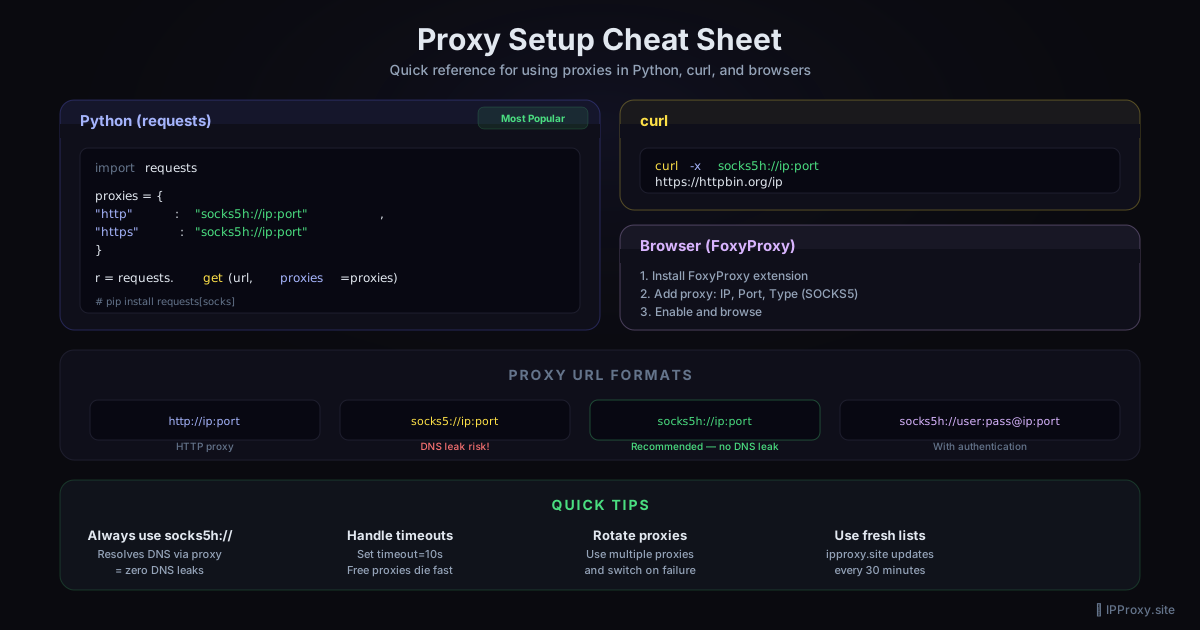
Two common causes: the target site is using DNS leak detection (your DNS requests bypass the proxy), or you have a NO_PROXY environment variable set that matches the domain. Check os.environ.get("NO_PROXY") and clear it if needed. For full DNS routing through the proxy, switch to SOCKS5 with socks5h:// (the h means DNS is resolved through the proxy too):
proxies = {"https": "socks5h://IP:PORT"}
What's the difference between socks5:// and socks5h://?
socks5:// resolves DNS locally, then tunnels the connection. socks5h:// sends the hostname to the proxy server, which resolves DNS remotely. Use socks5h:// when you want the proxy to handle DNS — this is more anonymous and avoids DNS leaks.
Related Guides
- How to Use a SOCKS5 Proxy with Python — advanced SOCKS5 with aiohttp and urllib3
- HTTP vs SOCKS5 Proxies: Key Differences — choose the right proxy type
- Free SOCKS5 Proxy List 2026 — validated SOCKS5 proxies, updated every 30 min
- Free Proxy Checker — verify any proxy is working before using it in your code
Get a Fresh, Tested Proxy Right Now
Every proxy is validated every 30 minutes. 1354 working proxies available right now.