Free SOCKS5 Proxy List 2026 — Updated Every 30 Minutes
Get a free, tested SOCKS5 proxy list updated every 30 minutes. All proxies validated for speed and connectivity. No sign-up required.
Finding a working SOCKS5 proxy in 2026 is harder than it looks. Most free lists online are collected once and never updated — by the time you copy an address, the server is already offline. This guide explains what SOCKS5 is, why it beats HTTP proxies for most tasks, and where to get a list that's actually been tested in the last 30 minutes.
What Is a SOCKS5 Proxy?
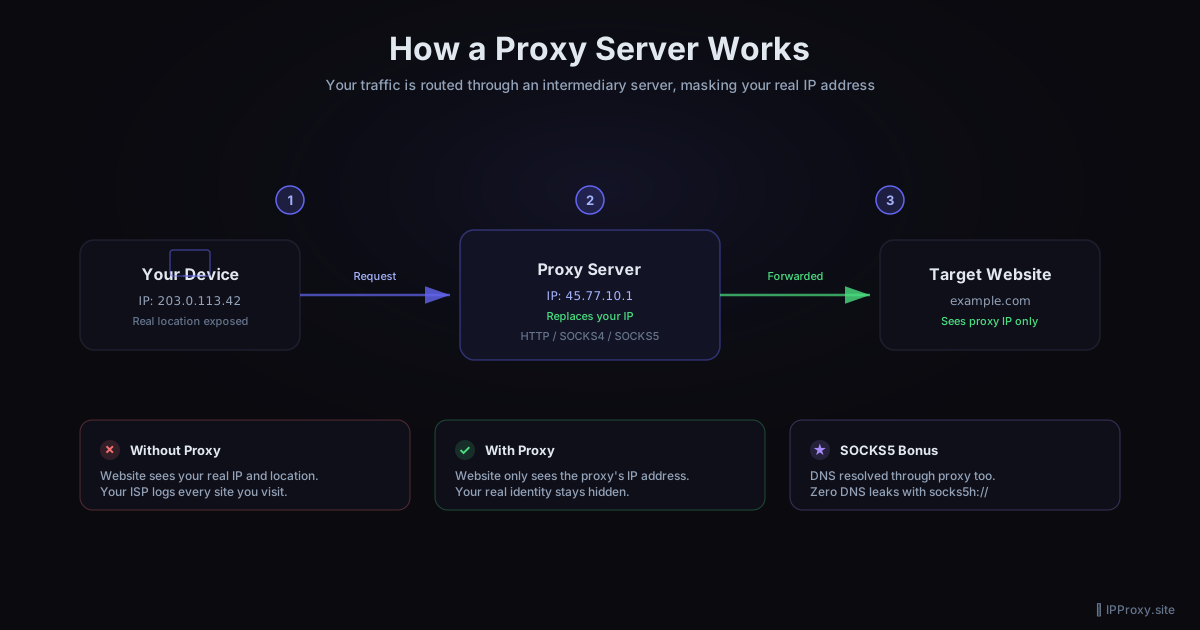
A SOCKS5 proxy is a general-purpose relay server that sits between your device and the internet. Unlike an HTTP proxy — which only handles web traffic — SOCKS5 works at a lower level. It can route any TCP or UDP connection, regardless of the protocol.
That means SOCKS5 works for:
- Web browsing
- Torrent clients
- Online games
- Email clients
- Web scrapers that use non-HTTP libraries
- SSH tunnels
SOCKS5 also supports authentication and handles UDP traffic, two things SOCKS4 cannot do. HTTP proxies, by contrast, can only forward HTTP and HTTPS requests.
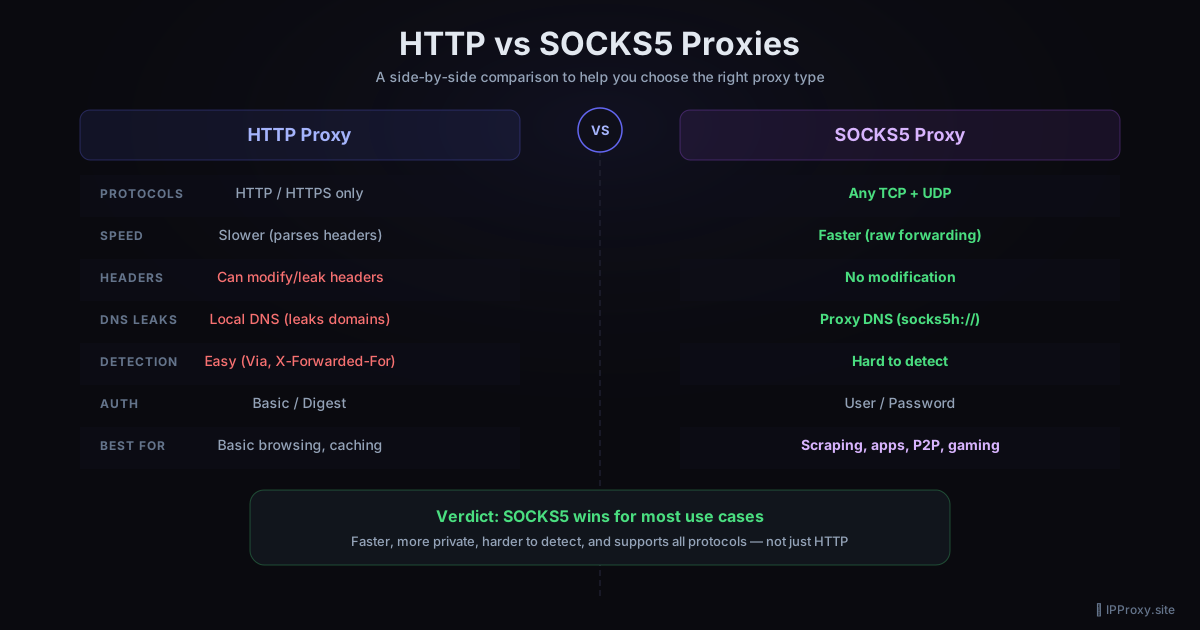
SOCKS5 vs HTTP Proxy: Which Should You Use?
| Feature | SOCKS5 | HTTP Proxy |
|---|---|---|
| Works with any protocol | ✓ | ✗ (HTTP/HTTPS only) |
| UDP support | ✓ | ✗ |
| Authentication support | ✓ | Limited |
| Speed | Faster (no header inspection) | Slower |
| Anonymity | Higher | Lower |
| Free availability | Less common | More common |
For casual browsing or testing, a free HTTP proxy is fine. For anything else — scraping, torrenting, gaming, or privacy-sensitive tasks — SOCKS5 is the right choice. For a deeper comparison, read our guide on HTTP vs SOCKS5 proxies.
Why Free SOCKS5 Proxies Go Offline So Quickly
Free SOCKS5 proxies are almost always unmanaged open relay servers. They exist because:
- A server was misconfigured and is unintentionally relaying traffic
- A researcher or developer spun up a test proxy and forgot to close it
- An older VPN service is leaking relay endpoints
None of these are maintained. The moment the owner notices unusual traffic, or the server is patched, the proxy goes offline. A list collected 48 hours ago can have a dead rate above 90%.
This is why validation matters more than list size. A list of 200 proxies tested 20 minutes ago beats a list of 10,000 proxies tested last week.
How We Keep This List Fresh
The free proxy list at IPProxy.site runs an automated pipeline that:
- Scrapes 10 public GitHub proxy repositories every 30 minutes
- Validates every proxy by making a real HTTP request through it with a 10-second timeout
- Records response time so the fastest proxies surface at the top
- Removes dead proxies from the active list immediately
The result is a list where every entry was proven working within the last 30 minutes. The SOCKS5 list — which tends to be smaller and harder to find — is available as a bulk download after completing one free offer.
How to Use a SOCKS5 Proxy
In a browser (Chrome/Firefox)
The easiest option is a browser extension like FoxyProxy (available for both Chrome and Firefox). Install it, add a new proxy profile, select SOCKS5, and enter the IP and port from the list.
In Python with the requests library
The requests library supports SOCKS5 proxies via requests[socks]:
pip install requests[socks]
import requests

proxies = {
    "http":  "socks5://IP:PORT",
    "https": "socks5://IP:PORT",
}

response = requests.get("https://httpbin.org/ip", proxies=proxies, timeout=10)
print(response.json())
In curl
curl --proxy socks5://IP:PORT https://httpbin.org/ip
System-wide on Windows
Go to Settings → Network & Internet → Proxy, enable "Use a proxy server", enter the IP and port. Note: Windows system proxy settings apply only to HTTP/HTTPS by default. For SOCKS5 system-wide routing, you need a tool like Proxifier.
How to Test If a SOCKS5 Proxy Is Working
Before using a proxy for anything important, verify it works:
import requests

def test_proxy(ip, port):
    proxies = {"https": f"socks5://{ip}:{port}"}
    try:
        r = requests.get("https://httpbin.org/ip", proxies=proxies, timeout=8)
        print(f"OK — your IP shows as: {r.json()['origin']}")
    except Exception as e:
        print(f"FAILED — {e}")

test_proxy("YOUR_PROXY_IP", YOUR_PORT)
If the returned IP matches the proxy address (not your real IP), the proxy is working and anonymous.
Frequently Asked Questions
Is it safe to use a free SOCKS5 proxy?
Free proxies carry risk. Since you don't know who runs the server, your traffic passes through a machine you don't control. Avoid sending passwords, session tokens, or sensitive data through a free proxy. For anonymous browsing or scraping public data, the risk is generally acceptable. For anything sensitive, use a paid VPN or paid proxy service.
What is the difference between SOCKS5 and a VPN?
A VPN encrypts all traffic between your device and the VPN server and routes everything through it. A SOCKS5 proxy only routes traffic from the specific application you configure — it does not encrypt, and it does not affect other apps. VPNs are better for full anonymity; proxies are better for per-app routing and speed.
Why does the SOCKS5 list change every time I download it?
Because the proxies themselves go offline constantly. A SOCKS5 address that worked an hour ago may already be dead. Each download reflects the current validated state of the list. This is a feature, not a bug — a stale list is worse than no list.
How many SOCKS5 proxies are in the list?
The count varies depending on how many passed validation in the last cycle. Typically between 150 and 400 working SOCKS5 proxies at any given time. You can see the current count on the homepage.
Can I use these proxies for torrenting?
Technically yes — SOCKS5 supports the UDP traffic that BitTorrent uses. However, free proxies are slow and unreliable. For torrenting, expect inconsistent speeds and frequent disconnections. A paid SOCKS5 proxy is a better choice for that use case.
Related Guides
- How to Use a SOCKS5 Proxy with Python — code examples for requests, aiohttp, and urllib3
- How to Bypass Geo-Restrictions with a Free Proxy — step-by-step browser and script setup
- HTTP vs SOCKS5 Proxies: Key Differences — full comparison to help you choose
- Free Proxy Format Converter — convert proxy lists between formats instantly
Get a Fresh, Tested Proxy Right Now
Every proxy is validated every 30 minutes. 1354 working proxies available right now.